
Onboard a new client's brand yourself in minutes, keep their cases, roster, and evidence separate from every other client, and hand each one reporting they'd never guess came from a shared tool.
Every detection capability on the features page runs exactly the same way underneath. This is what changes when you're running it across more than one brand.
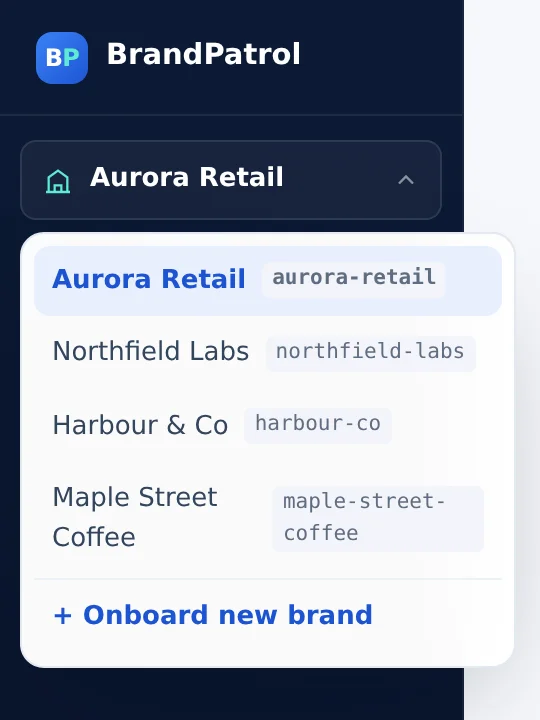
One login moves between client brands without a second sign-in. Each brand is a fully separate workspace: its own roster, its own monitoring groups, its own case list. Every account you add is granted into a specific brand, not the whole portfolio by default.
Name the brand and point it at their domain. A homepage scan proposes hero-product candidates by reading structured product data, the page title, and the main heading, then an AI-generated list of roughly 30 high-intent branded keywords gives you a starting draft. You review and edit it before monitoring goes live.
Every case already carries the affiliate ID, network, full redirect chain, and timestamped SERP and landing-page screenshots, plus the country and device it was observed on. Hand it straight to the client or their network, and track it through new, in progress, solved, and muted without rewriting anything.
The scanning and tracing itself works exactly like a single-brand account. See how it works. This is what's different about running it for a portfolio.
One login for your team, able to add new client brands and grant your people (or a client) access scoped to exactly the brands they should see. A brand-owner login never sees another client's workspace, even one running in the same agency account.
Name the brand and its domain, confirm the hero product a quick homepage scan proposes (or type it in), and start from an AI-suggested list of roughly 30 branded keywords you edit before anything goes live. No waiting on us to configure a new client.
Each client's cases, roster, and evidence stay inside that brand's own workspace, never mixed with another client's data, while you keep managing every brand from the one agency account.
Give a client a brand-owner login and they get everything they need inside their own brand, and nothing that would let them see, or even know about, the other clients running in the same agency account.
The same five-step flow applies whether this is your first client brand or your fifteenth. Drag the scene, or pick a step, to see how one agency account fans out into separate client workspaces. The scanning underneath is identical to a single-brand account, so the method and the feature set carry over unchanged.
Confirm the domain, the branded keywords that matter, the regions and devices to cover, and that you're authorized to manage this brand on your agency account before anything is configured.
Add the brand's name and domain from your agency account. Your account reaches the new workspace immediately; a separate login for the client (a brand-owner account scoped to just this brand) is a second Superadmin grant, made whenever you're ready to hand it over.
A scan of the domain you entered reads structured product data, the page title, and the main heading to suggest what the brand's hero product probably is. Confirm the suggestion or type in the right one.
An AI-generated shortlist of roughly 30 high-intent branded keywords appears next: a starting draft, not a finished list. Add the phrasing this client's customers actually search, cut what doesn't apply, before it goes live.
Scanning begins on the schedule you set. Anything found (hijacker or brand-bidder) appears only inside this client's own workspace, kept separate from every other brand in your portfolio.
Every package includes full case files, roster cross-checking, and the self-serve onboarding wizard. Final pricing depends on keyword volume and scan frequency per brand.
For agencies actively managing a handful of client brands and ready to offer brand protection as part of the package.
For agencies running brand protection across a full client roster, with clients who want to check in on their own brand.
For agency groups and holding companies running brand protection across many markets and business units.
Already run a single-brand account and want the agency workspace instead? We migrate your existing brand and history in, nothing to re-onboard.
Agencies already running BrandPatrol across their own portfolio tend to use the same case files with clients in a few consistent ways:
Brand protection becomes a named, recurring item on the retainer you already have, instead of a separate vendor relationship the client has to manage themselves. You're already the one fielding the cases.
Case history per brand (new, in progress, solved, muted) gives you a concrete slide for the quarterly business review: what showed up, what got resolved, and what's still open, instead of a qualitative update with nothing behind it.
When a client wants to push back on their own affiliate network about brand-bidding, the case file (affiliate ID, network, redirect chain, timestamped screenshots) is the same standard of evidence the network's own compliance team works from, ready to attach to the dispute instead of assembled from scratch.
Running a one-time snapshot audit on a prospective client's brand name turns a pitch meeting into something concrete: specific ads, specific affiliates, not a general claim that hijacking might be happening to them.
Case status is tracked per case, so a portfolio of brands stays readable instead of turning into one long list.
Each client brand has its own workspace, so a hijacker or brand-bidder case found for one client appears only inside that client's workspace.
A new case is waiting to be picked up. You see at a glance which brand it belongs to, with the affiliate ID, network, redirect chain and timestamped screenshots attached.
Move a case to in progress while you chase the partner or the network. The status makes it clear that someone is already on it, so nothing gets chased twice.
A resolved case ends as solved, and a muted case is set aside so it stops asking for attention. Either way the history stays per brand, ready for a quarterly review or a client conversation.
For general product questions, see the full FAQ, or compare single-brand plans and pricing.
Run every client from one agency account. You onboard each brand yourself as its own workspace: name and domain, confirm the hero product, then edit an AI-suggested list of roughly 30 branded keywords. Scans then run per brand, and each case, with affiliate ID, network, redirect chain and timestamped screenshots, lands only in that client's workspace.
Agency Starter is $349 per month for up to 5 client brands, Portfolio is $499 per month for up to 10, and Enterprise is custom with unlimited brands. One client's business in its own workspace counts as one brand, however many countries or devices you monitor it in. Final pricing depends on keyword volume and scan frequency per brand.
No. Each client's brand is a separate workspace, and access is granted per account per brand. Cases, roster and evidence stay inside that brand. A client's brand-owner login reaches only the one brand it was granted into, with no way to see that you manage any others.
The case file belongs to the brand it was built for, per our Terms of Service. Your client's evidence is theirs to use in their own dispute with a network or partner. BrandPatrol keeps the rights to the platform itself, not to the evidence it produces for your clients.
You remove their login the same way you would remove any other account's access. The brand and its case history stay in your agency workspace, still counted against your plan's brand limit unless you ask us to remove them. Data handling on removal follows the retention and deletion terms in our Privacy Policy.
Client-branded case reports carrying your agency's name are available on the Enterprise plan. The sign-in and the underlying workspace are still BrandPatrol, so this is not a fully white-labelled platform you re-skin end to end. On other plans, cases are client-ready but use the standard template.
As fast as you can fill in the onboarding wizard: name, domain, confirm or adjust the hero product, and review the suggested keyword list. There is no waiting on us for that part. A separate client login into the new brand, rather than just your own agency access, is the one step that goes through a Superadmin grant.
Tell us how many brands you're managing and their regions. We'll put together an agency plan sized to your portfolio.
Talk to us